
I am an end customer/user

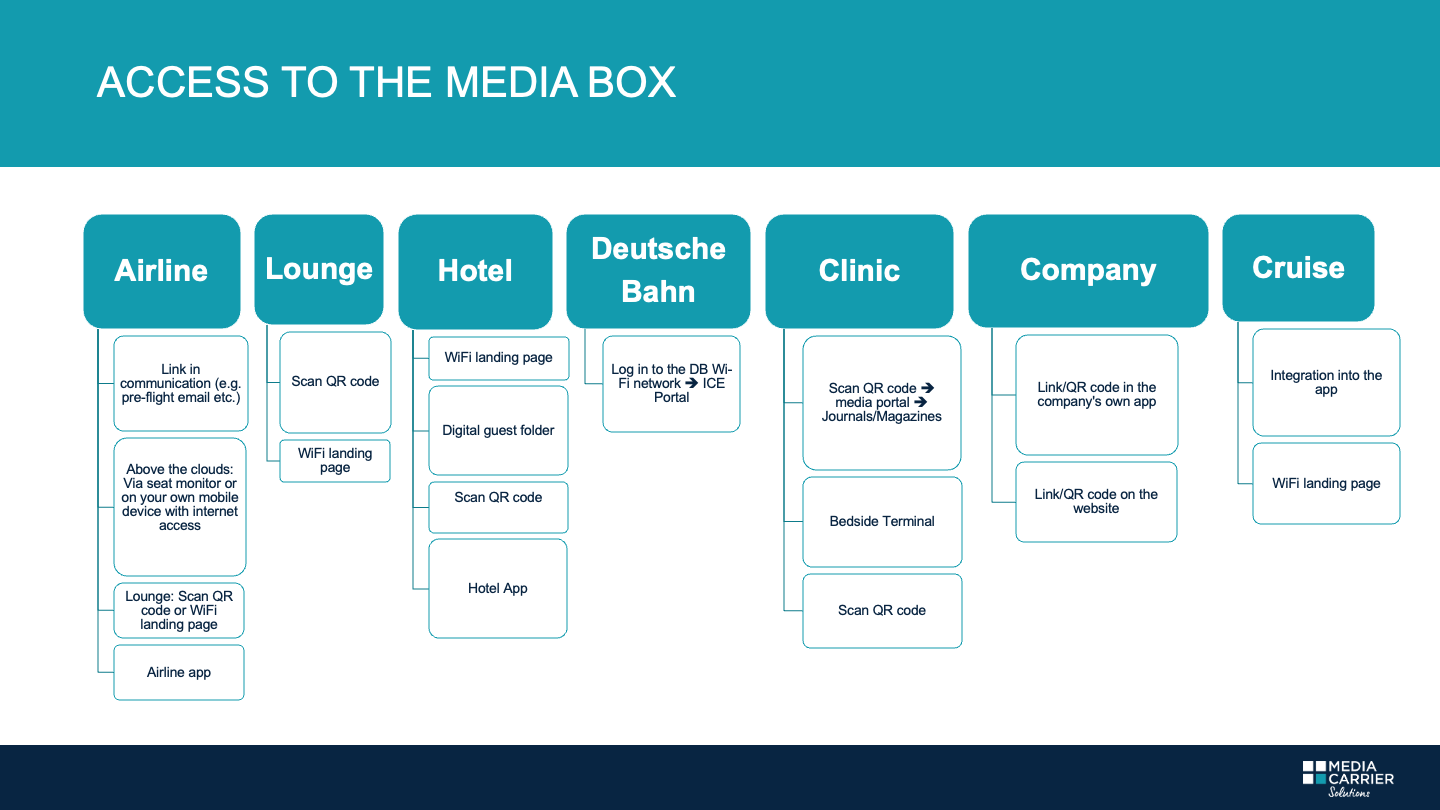
If our rea­ding and audio offe­rings are pro­vi­ded by an air­line, please call up your boo­king with your boo­king refe­rence (or Tra­vel ID). Depen­ding on your boo­king class, you will then see how many titles you can down­load and read free of charge. You will find the link to the media library in your boo­king con­fir­ma­tion, pre-flight email, check-in email, in the respec­tive air­li­ne’s app, etc. 

Then sim­ply click on the cover of your favo­rite title and start rea­ding. Good to know: Saving and rea­ding later is also pos­si­ble.

Tip: We recom­mend using a Wi-Fi con­nec­tion for the down­load and (due to rest­ric­tions on other brow­sers) using Chrome or Fire­fox (for Android devices) and Safari (for Apple devices). 

If you use our ser­vice via a hotel, you can find the link to your favo­rite news­pa­pers and maga­zi­nes in the hotel app, QR codes, pre-stay mai­lings, the hotel’s landing page or the digi­tal guest fol­der after log­ging into the hotel’s Wi-Fi. It is best to ask on site how to gain access. 

Then sim­ply click on the cover of your favo­rite title and start rea­ding. Good to know: Saving and rea­ding later is also pos­si­ble.

Tip: We recom­mend using a Wi-Fi con­nec­tion for the down­load and (due to rest­ric­tions on other brow­sers) using Chrome or Fire­fox (for Android devices) and Safari (for Apple devices). 

If you are acces­sing the publi­ca­ti­ons via a com­pany, it is best to check the respec­tive app and click on “Digi­tal News­pa­pers & Maga­zi­nes,” “Free Online Rea­ding Mate­rial,” “Digi­tal News­pa­per Kiosk,” etc.

Then sim­ply click on the cover of your favo­rite title and start rea­ding. Good to know: Saving and rea­ding later is also pos­si­ble.

Tip: We recom­mend using a Wi-Fi con­nec­tion for the down­load and (due to rest­ric­tions on other brow­sers) using Chrome or Fire­fox (for Android devices) and Safari (for Apple devices).

Are you curr­ently in hos­pi­tal? Oh dear, get well soon. To make your stay a little more plea­sant, a sel­ec­tion of our digi­tal rea­ding and audio offe­rings is available under “Maga­zi­nes” on the media por­tal, which you can easily access on your own mobile device after scan­ning the QR code. Alter­na­tively, you can find us via the bedside terminal. 

Then sim­ply click on the cover of your favo­rite title and start rea­ding. Good to know: Saving and rea­ding later is also pos­si­ble.

Tip: We recom­mend using a Wi-Fi con­nec­tion for the down­load and (due to rest­ric­tions on other brow­sers) using Chrome or Fire­fox (for Android devices) and Safari (for Apple devices). 

Down­load FAZ, Bunte & Co. to your smart­phone, tablet, or other device free of charge. 

If you access our ser­vice via an air­line, you will find the remai­ning usage period in the media library under the num­ber of available down­loads. If you use our ser­vice in a hotel, cli­nic, gym, or on Deut­sche Bahn trains, you can read wit­hout any time limit during your stay. 

Once saved, the publi­ca­tion will be available to you indefinitely.

Make sure you have the latest brow­ser ver­sion of iOS/Android instal­led on your device. Try using a dif­fe­rent brow­ser, such as Safari, Fire­fox, or Chrome. 

If the pro­blem per­sists, we recom­mend clea­ring your brow­ser’s cache (see brow­ser settings).

Good to know: If the down­load is inter­rupted for any reason, you can sel­ect and down­load the same title again, even if the num­ber of down­loads shows “0”.

  1. If you want to down­load the PDF file to the Books app, first open it in the Safari brow­ser and click once on any area of the document.
  2. The menu bar will open at the bot­tom of the dis­play. Click on “Copy to Books”. 
  3. The docu­ment will be auto­ma­ti­cally saved in “Books”.
  1. If you want to down­load a PDF file from the Inter­net to your Android device, first open your brow­ser and sel­ect the document.
  2. On most devices, the docu­ment will now be down­loa­ded auto­ma­ti­cally and will be loca­ted in your local “Down­loads” fol­der once the down­load is com­plete. You can now open the docu­ment in the fol­der by cli­cking on it. 
  3. When the PDF docu­ment opens in your brow­ser, you can save the PDF file locally by cli­cking on the “Save” icon (usually repre­sen­ted by a “floppy disk”). You will find the publi­ca­tion in your “Down­loads” folder. 

I am a customer/B2B

Whe­ther you repre­sent an air­line, hotel, cli­nic, or more, we pro­vide you with an info­tain­ment offe­ring that suits your com­pany – in your cor­po­rate design, wit­hout a sub­scrip­tion, with or wit­hout an app – with dif­fe­rent solu­ti­ons for dif­fe­rent areas of your busi­ness and the pay­ment sys­tem of your choice.

Request a quote

Top natio­nal and inter­na­tio­nal titles from 70 count­ries in over 40 lan­guages and pod­casts, for all ages and inte­rests, easy to inte­grate, in your cor­po­rate design. And: saving and rea­ding later is also pos­si­ble. Your guests and cus­to­mers can con­ti­nue rea­ding at home. 

Request a quote

Guests can easily access the media library on their own mobile devices via QR codes, Wi-Fi landing pages, com­pany apps, digi­tal guest fol­ders, etc. No regis­tra­tion, no extra app, no data sto­rage, and maxi­mum pro­tec­tion of user data. 

Yes. We design your uni­que media library accor­ding to your wis­hes: in the com­pany’s cor­po­rate design and with a sel­ec­tion of titles tail­o­red spe­ci­fi­cally to you. Of course, we also inte­grate your own publi­ca­ti­ons (as well as pod­casts or moving images). 

Yes. Ban­ners or adver­ti­se­ments can be easily integrated. 

Let your guests and cus­to­mers know about your fan­ta­stic new ser­vice offe­ring. Inform them in advance in the pre-stay email, boo­king con­fir­ma­tion, news­let­ter, push noti­fi­ca­ti­ons, and via your social media chan­nels. On site, you can adver­tise your new extra ser­vice with table dis­plays, sti­ckers, cards, and digi­tal screens. Feel free to cont­act us – we have pre­pared some great mar­ke­ting tips and tem­pla­tes for you.

Yes. We have been working with all digi­tal con­cierge solu­ti­ons for a long time. Inte­gra­tion is quick and easy. 

Our sup­port team is always there for you. Nico­las Bott, the “real” bot, will be happy to take care of your request at support@media-carrier.com.

But now really request a quote

Media Carrier Solutions